More Map/Timeline developments
Pixelmator Pro: a £35 Motion SVG plug-in
You can now import hand-drawn vectors from an iPad into Motion using this app. It makes me very happy: well done those guys.
I saw this post about a recent Pixelmator Pro update. You can now export vector assets as bona-fide Motion projects out of Pixelmator Pro (HT Ben and Luis, also Ripple Mark for this lovely demo video). I haven’t used Pixelmator in years (the Affinity guys have the edge in terms of iPad drawing and cross-platform transferability) so I didn’t get Pixelmator Pro when it came out because… it’s yet another thing in a folder of things. But this recent update got my attention. Essentially it links up the considerable strengths of hand-drawn iPad vector-tools with the animation-flexibility of Motion. It’s always a sadness when I have to make things in Motion because the tools are never that good - I have been drawing for years and the trackpad not the same for certain things. Earlier this week I resigned myself to constructing a map line using a trackpad because that’s how it’s done in Motion… click click click scroll click click etc. Now (with what is technically a £35 plug-in) I can draw confidently in the old way and send things across via SVG.
Here’s the process
draw something/anything on the iPad in Affinity Designer - making full use of the strengths of that life-changing Apple pencil
bring it back into the Mac and export as an SVG
move that file across into Pixelmator Pro
export as a Motion project
The (silent) clip below is not at all refined (hey this is process blog - what were you expecting, Instagram?). It is a further experiment where I am trying to link various behaviours to save animating everything using keyframes. The lines have all been drawn using the above method. I had actually already drawn them with the trackpad but went back to see if it was quicker/easier. It really was.
Linking behaviours brings greater flexibility
Some brief notes:
the drawn vector lines use the write-on behaviour to draw out (this may be problematic when I want them to slow and pause at different points - have yet to work this one out but I’m sure it’s possible)
it seems simpler somehow to have the route in two colours/parts for clarity
the ‘you are here’ circles use Motion Path behaviours that link to the geometry of said drawn vector routes
in the end I was having a lot of trouble getting the camera framing behaviour to obey my choices so I hand-keyframed the movements (in some ways this feels better anyhow because I like the imprecise feel of it)
forgive me, but the course incline box in the bottom corner is a visual mess (and probably too busy I think) but I wanted to give it a go - the steepness of the route seems like an important piece of info to impart so I thought I’d try and find a way of automating it. I connected the yellow and red route-halves to the main route animation with the link behaviour applied (using reverse behaviour for the second part to get it flowing in the correct direction). Unfortunately I had to resort to hand-key framing the sideways scrolling because I was too tired to work out how to animate the anchor point. It will hopefully come to me soon.
This represents some solid steps forward. Building behaviours into the guts of an animated timeline allow for some flexibility if you need to change things later, but they take a bit of getting your brain around.
Run Notes 2
This is my next attempt at recreating a running story. I’m not going to waste time talking this one out, so some brevity will have to do. Soz.
In my day job I work as a learning designer (a lengthy blog post has been been written telling the story - will link it here when I publish it imminently) - I am currently preparing to produce a set of course materials that utilise an animated historical timeline. I am mainly using Run Notes as an excuse to flex my muscles and learn effective ways of making this kind of thing quickly (and cheaply).
I wrote in a previous post about my earlier experiments. This one is a stage on. Some bullets:
I used a GoPro Hero 10 and ‘Shorty’ in my Salomon 8L backpack - very compact and light to use. It worked way better than the Insta360 set up and was much more convenient than taking my bag off and taking my phone out - it was also very quick to get to the footage which was such a barrier with the Insta360 system. In this instance I think I might have used it too much. I was just finding my way after all - on the actual Three Forts Challenge in a week or so I shall work out the points I want to record in advance and stick to that. It is possible to have too much of a good thing.
The initial screencapture process was way too exhausting - I had about 60 pngs saved and strung together - Motion couldn’t actually cope with them. In the end I had to use one simpler map - the one you see. One huge learning point is to try and find a sweet spot - how minimal can I get without losing impact?
On the GoPro front - it is worth saying that it is a remarkably smooth and reliable system with very pleasing results. I did some timeworn recording on my bike yesterday and it is just easy. I am still finding my way on the use of Wide/Narrow shooting modes. Will need to practice that a little more before the big day I think.
Having small images appear on the screen is okay… I think I want to try a slightly different mode next time. I like that there is a unified map and that everything links back to it.
The more conventional non-satellite map is impossible to stitch in Affinity Photo as a panorama - satellite works way better - more details to find and link up.
So in terms of developing an effective visual language this one is making forward steps. Will post more as I go.
Career Journey Map
Back in mid 2021 (I know, I was busy!) Culham St Gabriel’s Trust approached me to produce a teacher’s career map. They wanted something which would help specialists to reflect on where they were heading and how to get help going from within the Religion and Worldviews community.
This is what we arrived at:

There are four profiles to follow across the map.

They should probably make this into a board game or something.
Each of the profiles links to a more detailed grid which is updated with useful information.
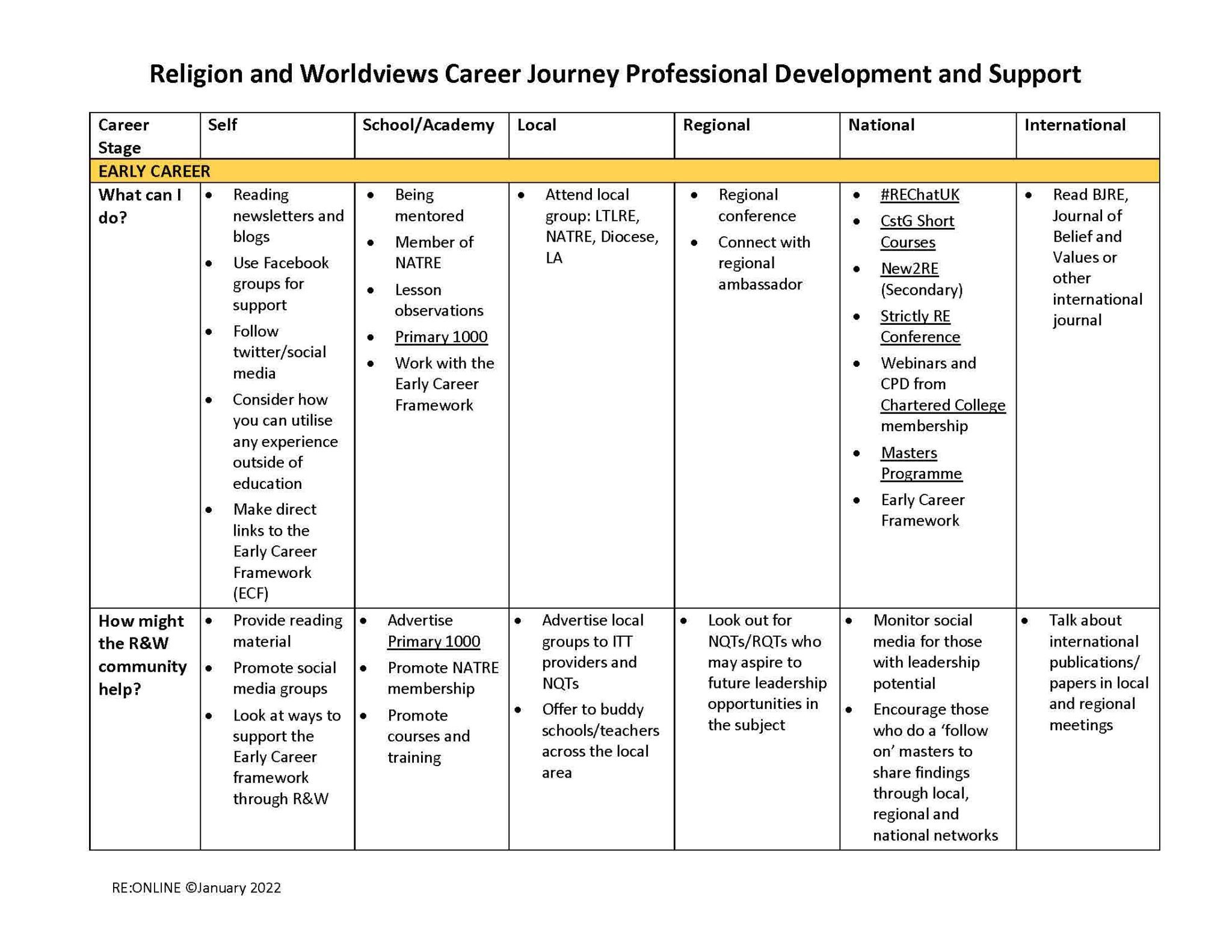
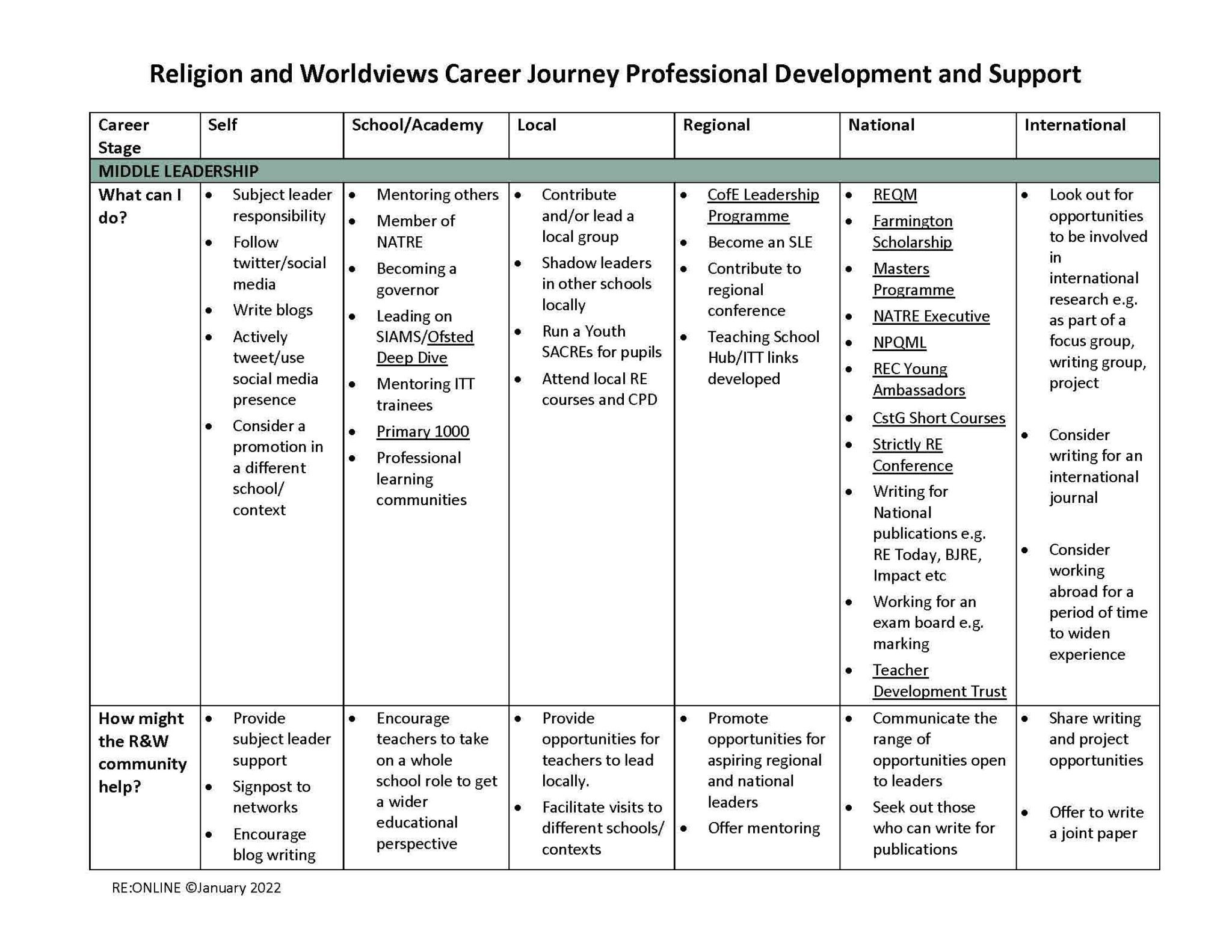
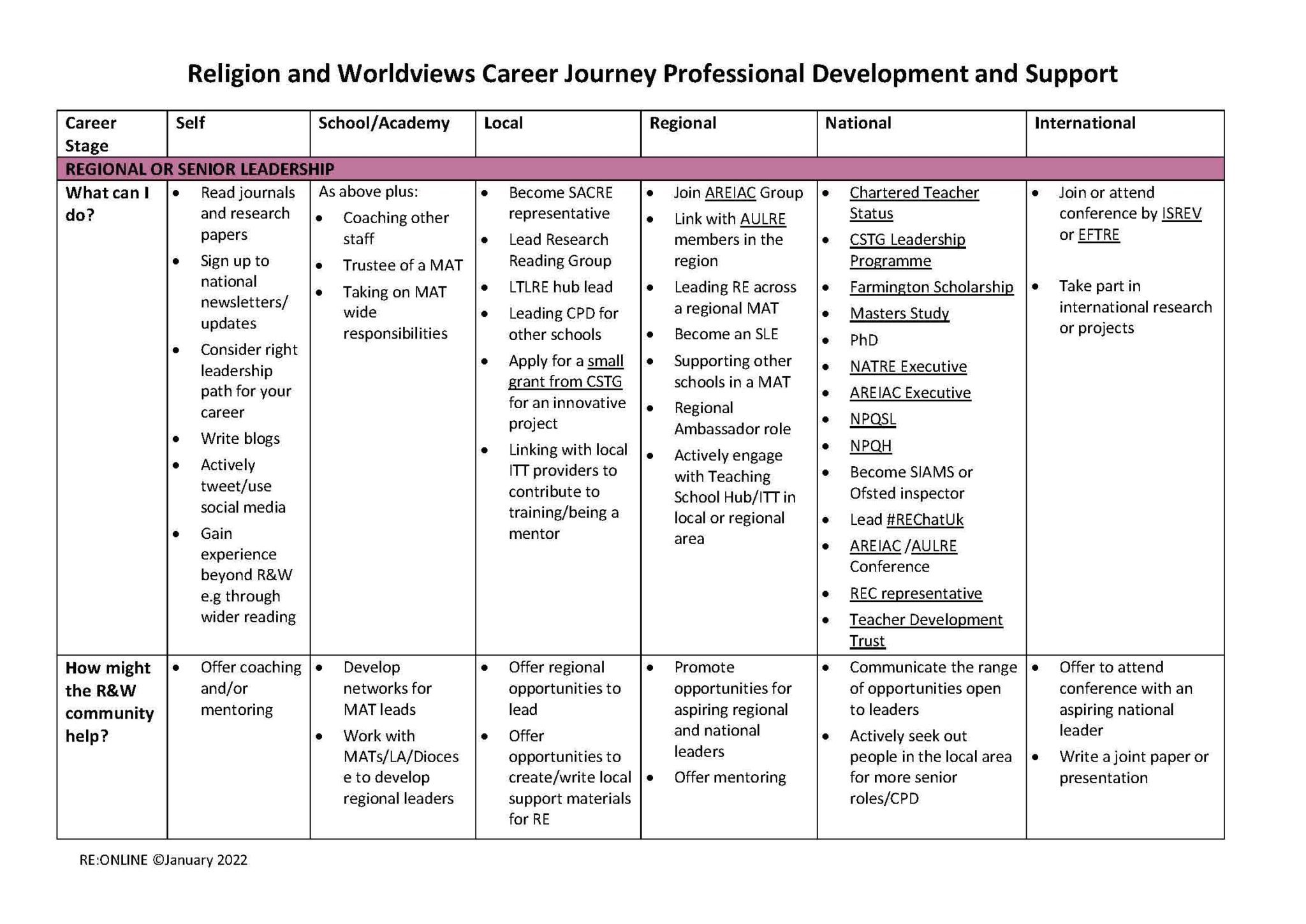
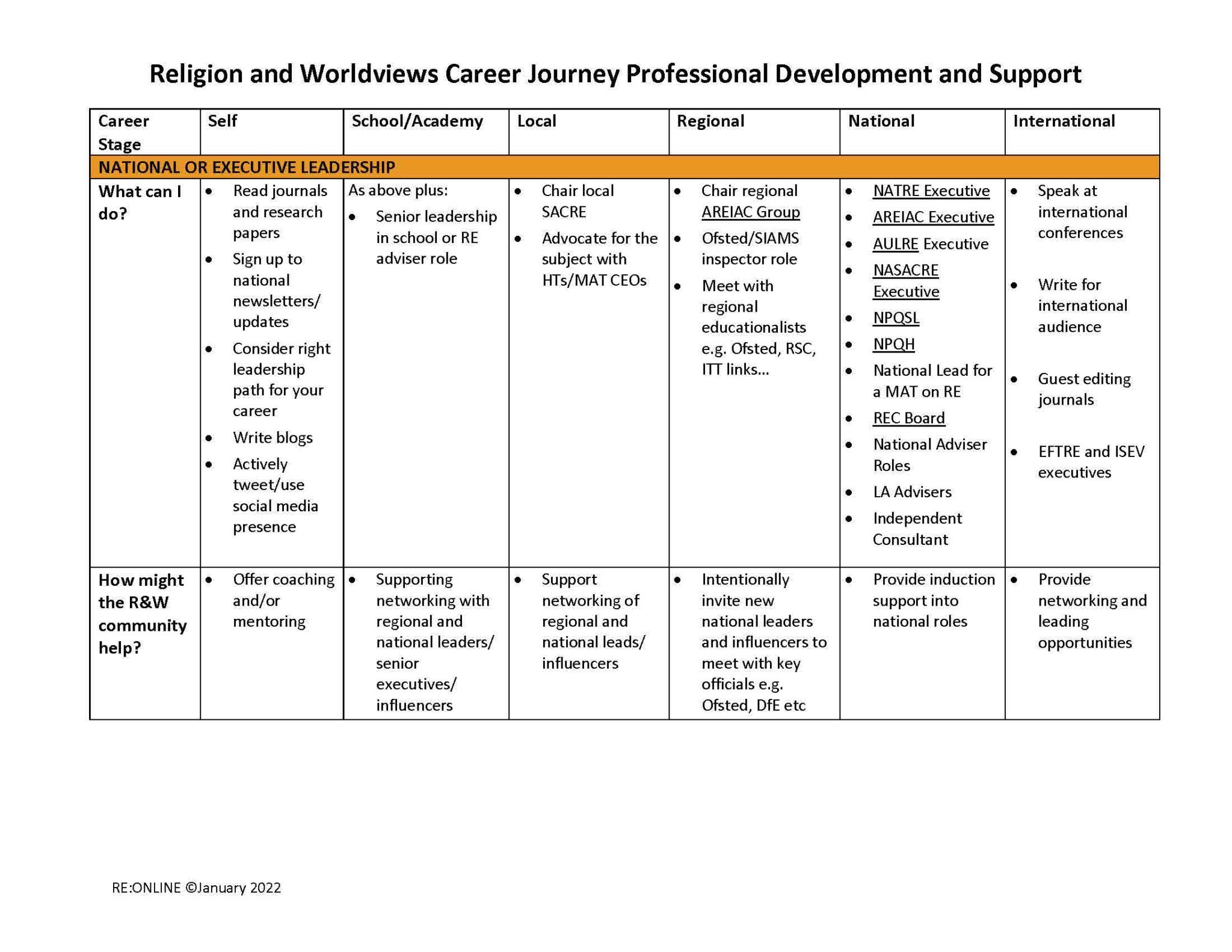
I spent many years working as a teacher in this area and it was so satisfying to make this map because I know how important this information would have been for me at different points. Professional development and a sense of direction are often crucial for surviving different (and unfortunately, occasionally toxic) work environments. I love that Culham St Gabriel’s works so hard at joining up the supportive dots in so many ways. More info here.
Thankyou to Dr Kathryn Wright for involving me in a valuable project.
The Three Forts Challenge T Shirt Design 2022
I was given the opportunity to re-design the latest Three Forts Challenge T Shirt!


This is the best I can do until I get my own (ironed) one in a week or so when the actual run happens.

This is the reverse design - having spent some time running behind people with well-designed shirts I realised that this was an opportunity to give people something to reflect on… I tried to summarise both courses (and the thrill of it) in one simple image. Thanks Duncan Anderson for the opportunity.
In May 2018 I ran the Three Forts Half Marathon with one of my best mates. Billed as ‘The Tough One’ the course is not a standard marathon course - it rejoices in exhausting steep hills with spectacular South Downs views. Forget standard times too - this is not ideal if you are watching the clock - it is more about the experience. That day was unusually hot and I am still unsure how I managed to get round. I produced this very personal infographic celebrating the event. Overall we had a really brilliant time.

We ran it a second time in May 2021 - some appropriate post pandemic relief and a chance to catch up. Here’s a roughly chopped public edit of something I shot on the day with a 360 camera. Excuse the rough edges but you’ll get the general idea. I highly recommend this course if you haven’t tried it before - we had such a blast.
So my next adventure begins in two weeks’ time. I am stepping into my first marathon as I take the full 27 mile course onboard. To be brutally honest I don’t really care for marathons - it’s all about the experience of those hills. The cut-off time is 6 hours(!). I figured that since I’ve been doing 20 miles in just over 4 hours, if things get really bad and I walk for seven of those miles I should hopefully get to the end… will post an update when it’s all over.